The EA Copilot EA
EA Copilot is using it’s own EA to sync your trading data from MT5 to the EA Copilot website.
Installation of the EA is a simple process, just like your other EA’s. The chart on which you place the EA doesn’t matter, it can be any chart. Just as the timeframe also doesn’t matter, it can be any timeframe (the default 1H will do just fine).
When the EA is started there is an initial synchronization for the historical trades, and an instant sync of new trades.
Be sure to create your broker account first on the website, so that the EA has the account available to sync to.
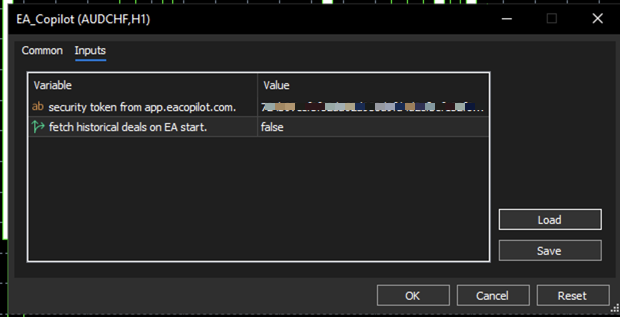
The only real input needed for the EA to work is your security token from the website, so that the EA knows to which user the data belongs.
The second option to fetch historical deals is to be set to “true” when you launch the EA on a new account, so that your trading history is synced. Be aware that not all brokers store all of the transactions forever. This means that if the account is seriously old, depending on your broker not all history might be there anymore, and reconstructing the account reliably might not be possible in those cases. Having said that, we haven’t see that yet.
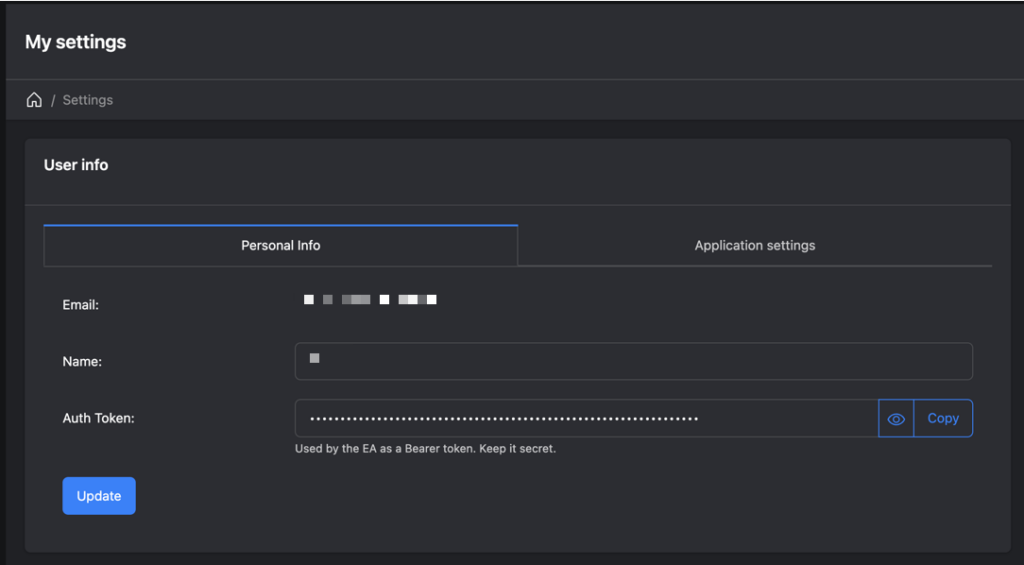
The security token can be found in your account.
Once logged in, go to the user settings at top right, and select “My Settings”. On the page that will be shown copy the “Auth token” by clicking on the “Copy” button. Paste that token into your “security token…” setting of the EA and you’re good to go.
That is all there is to it. The EA will start syncing.
Download your copy of the EA today, and start logging your trades like a pro. Click the button below to obtain the EA, and create an account on the website to start.